Try the receiver
This is the receiver's screen, drawn in your browser the way the firmware draws it. The signals are a simulation, made up on this page, not a recording from a dongle. Tap a signal to tune to it, step with the keys along the top, or tap the frequency to change the look. It draws the spectrum, waterfall and five looks; it plays no sound and leaves out the signal markers, the S/N meter and the audio plate.
On a keyboard: click the screen, then ← → step 100 kHz (with Shift, 1 MHz) and ↑ ↓ jump to the next signal.
What it does
- Spectrum and waterfall. See 2.4 MHz of the radio band at about 10 frames a second. Tap a signal to tune to it, and step up or down with the keys along the top. Up to three strong signals elsewhere get a marker with their frequency, and an S/N bar meter reads the tuned one.
- Audio. Broadcast FM, narrow FM and AM through the kit's speaker connector, with volume and a squelch that fades instead of clicking. It hasn't been heard on a speaker yet (see Status and limits).
- RDS. On broadcast FM the station's name shows on the spectrum, and the serial log gets its programme ID and RadioText.
- Channel memories. Eight slots, each a frequency and a mode, and a memory scan that stops on activity.
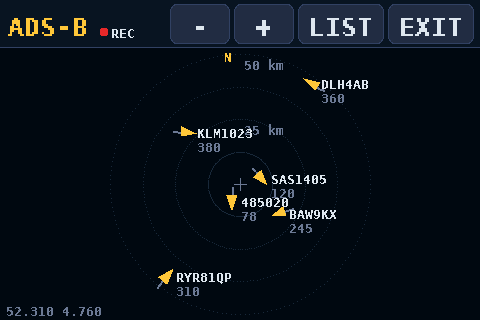
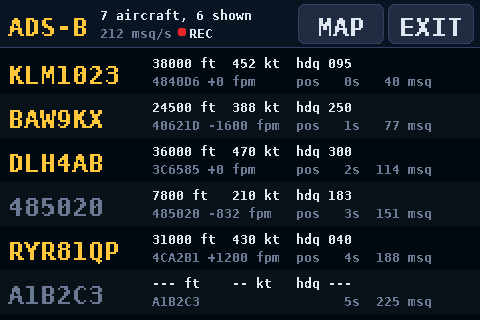
- Aircraft. ADS-B at 1090 MHz shows a list of planes (callsign, altitude, speed, heading, climb) and a map with range rings out to 400 km. Once a plane has a fix, each new position frame moves it, and every fix is checked for impossible jumps. Put a map file on a micro-SD card and the map also draws coastlines, roads, runways, towns and airports.
- Wi-Fi scanner. It lists nearby 2.4 GHz networks, strongest first, with a channel view that shows how crowded each channel is.
- Bluetooth scanner. It lists nearby BLE devices with their name or maker, signal strength and how often they advertise.
- Logging. With a micro-SD card in, every plane, network and device it hears goes into a CSV file you can open in a spreadsheet. A red REC dot shows when it's recording.
- Five looks. Studio, PortaPack, Phosphor (green CRT), Vintage (walnut and amber) and Neon (violet and cyan).
- Landscape or portrait. Stand the kit up with its USB ports at the top, and every screen has a portrait layout.
- Receiver
- 2.4 MHz of spectrum and waterfall, about 10 fps; WFM, NFM and AM audio, RDS on broadcast FM
- ADS-B
- Aircraft list and map, rings to 400 km
- Scanners
- 2.4 GHz Wi-Fi and BLE on the kit's ESP32-C6
- Logging
- CSV files on the micro-SD card
- Licence
- GPL-3.0
What you need
- The Waveshare ESP32-P4-Module-DEV-KIT and a 3.5-inch Raspberry Pi touchscreen. The tested one is the MHS-3.5inch Display-IPS; the older MPI3501 uses the same protocol but hasn't been tried. Not sure about the screen? See Is this my screen?
- An RTL-SDR Blog V4 dongle and an antenna. A 1090 MHz antenna is best for aircraft. The V4 is the only dongle tested so far.
- Optionally, a small 8 Ω speaker with an MX1.25 2-pin plug, for the kit's speaker connector.
- Optionally, a FAT32 micro-SD card, for the map and the logs.
- A USB-C data cable. Some cables only charge.
- Chrome or Edge on a computer. The Flash page uses Web Serial, which Safari, Firefox and phones don't have.
Flash it from your browser
- Plug the screen onto the kit's 40-pin header, pin 1 to pin 1 (the square pad at the 3V3 end).
- Connect the kit's USB TO UART Type-C port to your computer.
- Click Flash P4 SDR, then Connect ESP32. The Flash page reads your chip's revision and picks the matching image:
-rev1for v1.x (early kits),-rev3for v3.1 or later. It checks the image's SHA-256 before writing it. - Set the H3 jumper for USB host and plug the dongle into one of the kit's USB-A ports. On the test kit that's the cap on the two pins nearest the DEVICE label; if the dongle isn't found, move the cap to the other pair.
Flashing clears the touch calibration saved on the board. On first boot you tap five targets to set it up again. If flashing fails with the screen fitted, unplug the screen to flash (GPIO36 is a strapping pin) or use the kit's USB-Serial-JTAG port.
Rather use a terminal? The README has the esptool.py commands.
It boots to a short tune-in splash in the saved look. On first boot it runs the touch calibration (to redo it later, hold the screen during the splash), then looks for the dongle, checks the USB link for 1.5 seconds and starts the receiver at 100.0 MHz, in the FM band. After that it starts where you left it.
Using it
Along the top of the receiver:
-1M-100k+100k+1Mstep the frequency. Hold one to repeat.- The frequency readout switches to the next look.
MENU(the gain is shown under it) opens the menu.- Tap the spectrum or waterfall to tune to the spot where you lift your finger.
The menu is eight big tiles:
- Gain
- Steps through every tuner gain, or picks AGC, 15, 30 or MAX.
- Range
- Auto, or set the top level and the span in 5 dB steps.
- Zoom
- Shows 2.4 MHz, 1.2 MHz, 600 kHz or 300 kHz of the band.
- Audio
- The filter, which also picks the mode: WFM 200k, NFM 25k, NFM 12.5k or AM 8k. Volume and squelch, each with - and +.
- Band
- Jumps to FM, AIR, MARINE, NOAA, 2M, PMR, 70CM or ADS-B.
- Scan
- Opens the Wi-Fi or BLE scanner. Save stores the tuned channel in one of 8 memories; Memory tunes one, and its Scan key hops through them, stopping while the squelch is open.
- Look
- Studio, PortaPack, Phosphor, Vintage or Neon. Turn switches landscape and portrait.
- Done
- Back to the radio.
ADS-B, Wi-Fi and BLE each take over the whole screen and pause the receiver. EXIT starts it again. The README has the details.
The receiver
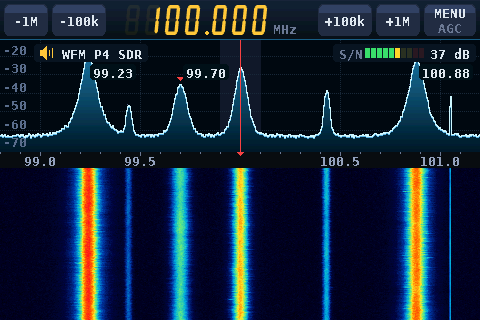
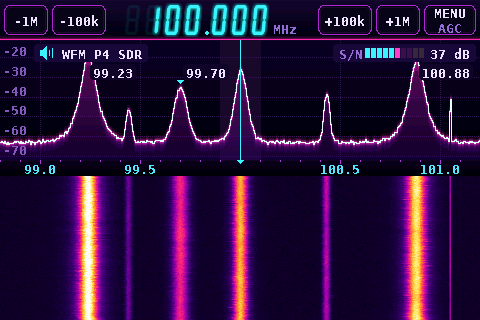
The plate at the top left shows the mode, and its speaker lights while sound plays. On broadcast FM the station's RDS name replaces the volume there. The screenshots on this page are renders from the repo's preview tool, with a made-up band, station and aircraft.
Listening
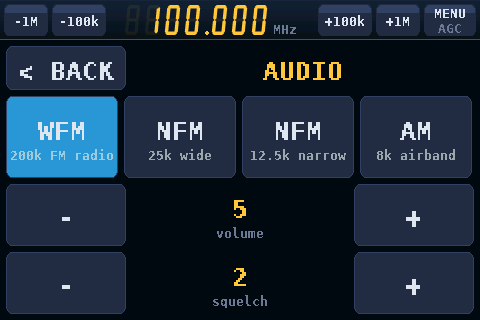
Audio goes through the kit's ES8311 codec and amplifier to its 2-pin speaker connector. FM is mono. Squelch 0 is open; each step up asks for 3 dB more, so on FM a station already on the air opens it, and on AM the signal has to stand that far above the noise. It fades in and out instead of clicking. On the kit the WFM demodulator takes 45 to 46% of one core with RDS running, and the spectrum keeps 9.7 frames a second.
Portrait
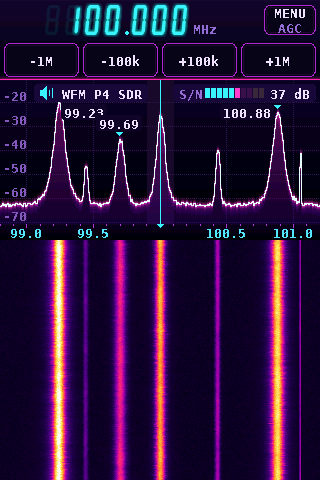
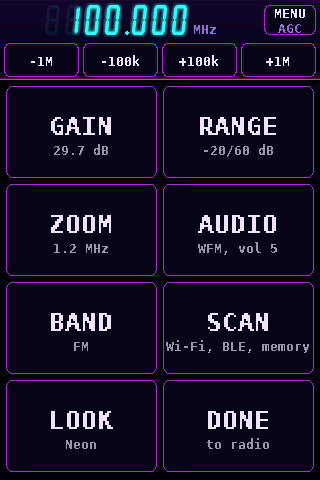
Look › Turn stands the kit up with its USB-A and Ethernet ports, and the dongle, at the top. The step keys move under the frequency and the menu stands two tiles wide. The touch calibration is turned in software, so there's nothing to redo.
The aircraft map
Planes show up on the map and in the list as soon as their ADS-B messages come in. After the first fix, each position frame moves the plane on its own, and a fix that would mean an impossible jump is held back until the next ones agree. That logic is ported from John Stockdale's ADS-B Scope. The map works without a card: aircraft, range rings and the compass. For coastlines, roads, runways, towns and airports, it reads a MAP.BIN file from the micro-SD card. You make that file on a computer with the repo's map tool, centred near your antenna:
python3 tools/mapgen/make_map.py --place "Your town" --out /Volumes/SDCARD/MAP.BINIt builds the map from Natural Earth data, with OpenStreetMap detail close in, and needs nothing but Python. Copy MAP.BIN to the root of a FAT32 card and put the card in the kit's slot. The README covers the options.
Logs
With a FAT32 card in, each mode writes a CSV file to LOGS/ on the card while it's open, and the header shows a red REC dot. Every power-on starts a new set of files.
| File | One row |
|---|---|
| ADSBnnnn.CSV | An aircraft, at most every 5 s, when it's been heard since its last row |
| WIFInnnn.CSV | A network heard in a sweep (about every 2 s) |
| BLEnnnn.CSV | A device heard in the last 5 s |
The kit has no clock, so times are seconds since power-on. The README lists every column.
Status and limits
- Audio hasn't been heard on a speaker yet. The demodulator passes its PC test and runs on the kit, but nobody has listened to it.
- On a strong FM station the tuner's AGC can overload the dongle, and RDS loses about half its blocks. A fixed gain around 15 dB (MENU › GAIN) decodes cleanly. It's tracked in issue #44.
- Tested on a v1.0 kit with the RTL-SDR Blog V4. In one long run, 44 minutes of aircraft tracking with logging on lost no data. With the single-frame positions, 38 minutes of live traffic tracked 53 aircraft with no position jumps.
- The rev3 image is built from the same source but hasn't run on a v3 chip yet. If you have one, reports are welcome in issue #3.
- Wi-Fi scanning is 2.4 GHz only: the C6 has no 5 GHz radio.
Credits
Firmware by John O'Dell, John-ODell/esp32-p4-rtl-sdr, GPL-3.0. It uses librtlsdr from the RTL-SDR Blog fork (GPL-2.0-or-later), and Espressif's ESP-IDF and esp_hosted (Apache-2.0). The ADS-B single-frame positions and jump checks are ported from John Stockdale's ADS-B Scope (GPL-3.0), with thanks to him for offering it; RTL-SDR.com wrote it up in Portable ADS-B receiver firmware for the LilyGO T-Display-P4. The map tool uses Natural Earth (public domain) and OpenStreetMap data (© OpenStreetMap contributors, ODbL). The full list is in its THIRD_PARTY.md. The screenshots are from the repo, and the drawing on the Builds list is the site's own. Try the receiver is the site's own simulation, drawn with the firmware's colours and layout.